If your steam shower is producing more steam than expected or the cabin is getting hotter than it should, check the timer and temperature settings on the control panel first. This is the most common cause. A generator that won't stop heating even after the set time is different, and points to a fault rather than a setting.
Applies to: steam showers
INTRO HERE
Compatible with many shower cabin brands including



Quick diagnosis
If your steam shower is showing these symptoms:
- The cabin feels hotter than usual for the same setting
- Steam keeps building well past the time you'd expect it to level off
- The generator doesn't stop when the timer should have ended the session
- The room feels uncomfortably hot or humid compared to previous sessions
- Steam is thicker or denser than normal from the start of the session
Likely causes, most likely first
- The timer or temperature setting has been changed. Check the control panel settings against what you’d normally use.
- A faulty cabin temperature sensor. The sensor reads the cabin as cooler than it actually is, so the generator keeps heating well past where it should stop.
- A stuck relay or control fault keeping the heating element powered. The generator won’t switch off even when you press stop, or starts heating again as soon as power is restored after isolating it.
Likely cause
The most common reason is simply that the timer or temperature has been set higher than usual, whether by accident or by someone else using the shower. Many steam showers, Vidalux models included, cap a session at 15 minutes by design, so check your manual if you're not sure what your unit's limit should be. Where the cabin temperature sensor itself is faulty and reads low, the generator can keep heating because it thinks the cabin hasn't reached its target temperature. Where the generator won't stop even when you press off, that points to a stuck relay or a control fault rather than a setting, and it isn't something to keep using until it's checked.
Check this first
- Check the timer and temperature settings on the control panel match what you normally use.
- Try switching the unit off and back on at the panel to see if a normal stop and start clears it.
- Note whether the generator stops when you press the off button, or keeps running regardless.
How to identify your part
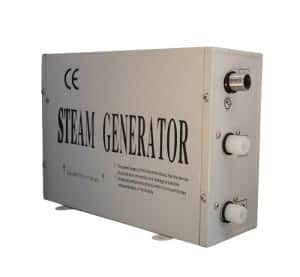
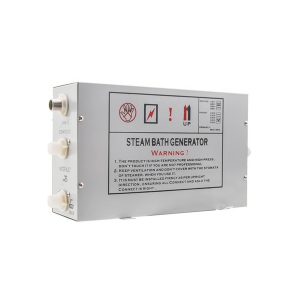
Steam generator electronics are supplied as matched sets, commonly coded TR019, MK117B or MK117BQ. Check the control-pad code printed on your panel before ordering a replacement. An all-in-one set replaces the generator and electronics together and isn’t compatible with a steam generator that has a separate electronics box, so match that arrangement too.
Parts that fix this problem
The following replacement parts usually fix this issue.
Not sure which replacement part you need? Send us a photo and we will help identify the correct replacement.
How to fix it
- Check the timer and temperature settings on the control panel and reset them to your normal session length
- Switch the unit fully off and back on to see if a normal restart clears the fault
- Stop using the shower if the generator won’t switch off when you press the stop button
- Isolate the power at the fused spur if the unit won’t stop heating, rather than leaving it running
Also described as
- Steam shower
- Steam shower cabin
- Hydro massage shower
When to call a professional
Stop using the shower and isolate the power at the fused spur if the generator won't switch off when you press stop. Call a qualified electrician rather than opening the control panel yourself. This is a safety fault, not routine maintenance.